
















MyStake on mobile: browser access, shortcuts and account checks
MyStake mobile access should be treated as browser-first. The safest setup is to open the current site in Chrome or Safari, check that the account area works and then add a home-screen shortcut from that browser.
That difference matters because a home-screen shortcut is not the same thing as an app-store download. A copied APK file, random download button or third-party app link should be avoided unless the MyStake account area clearly points to it.
MyStake app download or mobile shortcut?
The mobile setup is best described as a shortcut to the mobile site. It can feel app-like because it opens from the phone screen, but it still depends on browser access, account status, country access and site availability.
For safety, start from the correct domain and avoid copied download files. Mobile access should not require unknown APK files, unusual phone permissions or a link from a third-party coupon page.
How to add MyStake to the home screen on Android
Android users can create a shortcut from Chrome. This keeps the process inside the browser and avoids unsafe download files.
Go to the current MyStake site in Google Chrome and check the domain before logging in.
Tap the three-dot menu in the top-right corner of the browser.
Choose “Add to Home Screen” from the browser options.
Choose “Install App” or confirm the shortcut prompt shown by Chrome.
How to add MyStake to the home screen on iPhone
iPhone users should use Safari. Open the current MyStake site, tap the Share button, choose “Add to Home Screen” and confirm with “Add”.
This creates a browser shortcut. It does not prove that there is a native iOS app. Treat it as a faster way to open the mobile site while still checking login, cashier, bonus and responsible gambling tools inside the account.
Device, browser and connection checks
Mobile performance depends on browser support, screen size, connection stability and cookies. Before judging the mobile version, check that the browser is updated and the site can store session data.
Registration from mobile
Mobile registration can be completed from the browser, but the details should match documents and payment methods. Incorrect names, dates of birth, country information or email details can create problems later during KYC.
New users can review the full account setup flow on MyStake Sign Up before depositing or claiming a welcome offer.
MyStake Casino on mobile
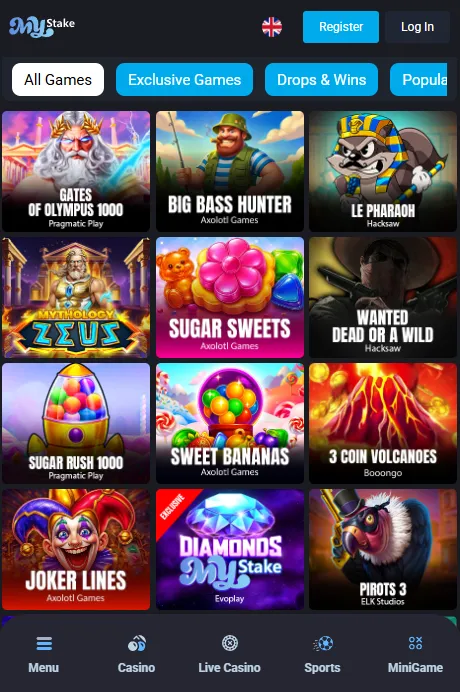
Casino games can be used from the mobile browser, but the experience depends on game type. Slots and mini-games usually load quickly, while live casino tables need a stable connection and more screen space.
Bonus play needs extra care on mobile. Casino welcome and reload offers can be tied to slot play, max bet rules and wagering. Mini-games or live dealer games may not count for some offers, so the active bonus status should be checked before playing.
The deeper casino rules are covered on the MyStake Casino page.
MyStake Sportsbook on mobile
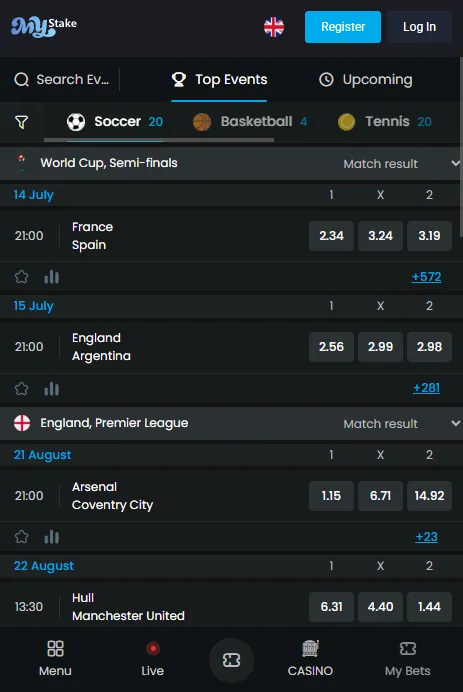
Sports betting on mobile works best when the bet slip is checked slowly. Live odds can change before the ticket is accepted, and a selected price is not the same as an accepted bet in the account.
Sports bonuses also have detailed rules. Minimum selections, minimum odds, excluded markets and activation timing can decide whether a bet counts toward wagering. This matters for welcome offers, reloads, free bets and Bet Builder tickets.
The sports betting flow is explained in more detail on the MyStake Sportsbook page.
Bonuses and promo codes on mobile
Mobile users can check the cashier, promotion pages and Profile > Bonuses. The important part is timing: a bonus should be activated before the first qualifying bet, spin or stake.
For casino and sportsbook rewards, check wagering, max bet, minimum odds, eligible games, excluded markets, expiry and cashout caps. The broader bonus rules are on the MyStake Bonus page.
Promo fields can also appear on mobile, but copied codes should not be trusted without active campaign terms. The code flow is covered separately on the MyStake Promo Code page.
Deposits, withdrawals and KYC from mobile
The mobile cashier can be used for deposit and withdrawal checks, but payment rules do not change because the player is on a phone. Minimum deposit is listed as €20 or equivalent, and deposited funds must be wagered once before withdrawal.
Standard withdrawal limits are listed as €7,500 per week and €15,000 per month or equivalent. KYC can include identity, address and payment proof, especially before withdrawals or during account review.
Promo code fields on mobile
Promo fields can appear inside the mobile cashier, campaign area or bonus activation flow. The code should match the active offer and should be entered before the first qualifying action when the campaign requires it.
Copied codes can fail because of country, currency, expiry, minimum deposit, account status or product category. The full code checklist is covered on the MyStake Promo Code page.
MyStake mobile not working: quick checks
Mobile access problems can come from the browser, connection, country access, cookies, cache, device settings or account review. Work through the simple checks before assuming the account is blocked.
Login, password reset and account security on mobile
Mobile login normally uses username or email with password. A verification prompt can appear depending on account status, device, login pattern or security checks.
Returning users can use MyStake Login for password reset, account access and cashier status. Keep login details private, avoid shared devices and do not save credentials in browsers you do not control.
Safer mobile gambling checks
Mobile gambling can feel faster than desktop play because the phone is always close. Set limits before long sessions, especially with live betting, mini-games, reload bonuses and free bet campaigns.
MyStake account tools can include limits, time-outs, self-exclusion and support access. Use them early if play stops feeling like entertainment. A home-screen shortcut should make access easier, not encourage uncontrolled sessions.
MyStake App pros and cons
| Pros | Cons |
|---|---|
| Mobile browser access works for casino, sportsbook, bonuses, cashier and account tools. | Do not assume an App Store or Google Play download unless the account area shows one. |
| Android and iPhone users can create home-screen shortcuts from Chrome or Safari. | Shortcuts still depend on browser access, site availability and account status. |
| Bonus activation, login, payments and verification messages can be checked from mobile. | Small screens make it easier to miss live odds changes, bonus status or payment details. |
| Mobile access is useful for quick account checks and live market updates. | Fast mini-games and live betting need stronger session and stake limits. |
MyStake App verdict
MyStake mobile access is useful for players who want casino games, sportsbook markets, bonus checks, cashier tools and account access from a phone. The cleanest setup is browser-first: open the current site, confirm the account works, then add a home-screen shortcut through Chrome or Safari.
The main warning is not to treat every “download” page as safe. Unless the account area shows an app-store route, avoid copied APK files and random app links. Mobile access should start from the correct domain and stay inside a secure browser.
For everyday use, check the bet slip, active bonus status, payment method, KYC messages and responsible gambling tools before playing. That makes the mobile version more practical and reduces the risk of missed rules.

Daniel Carter
Daniel Carter reviews online casino and sportsbook platforms with a focus on mobile access, bonus rules, payment checks, verification and safer gambling tools. Always compare this information with the current MyStake terms before depositing.
Open MyStake on mobile
Use the current MyStake site, check the mobile layout and confirm account, bonus and cashier status before playing.
FAQ
Does MyStake have a native mobile app?
Treat MyStake mobile access as browser-first unless the account area shows an app-store route. The practical setup is Chrome or Safari with a home-screen shortcut.
How do I add MyStake to my Android home screen?
Open the current MyStake site in Chrome, tap the three-dot menu, choose Add to Home Screen and confirm the shortcut or install prompt shown by Chrome.
How do I add MyStake to my iPhone home screen?
Open the current MyStake site in Safari, tap Share, choose Add to Home Screen and confirm with Add.
Can I register for MyStake from mobile?
Yes. Registration can be completed from a mobile browser, but account details should match documents and payment methods because KYC can be checked later.
Can I use MyStake Casino on mobile?
Yes. Slots, live casino, game shows and mini-games can be opened from mobile, but bonus eligibility and game contribution should be checked before playing with an active offer.
Can I use MyStake Sportsbook on mobile?
Yes. The sportsbook can be used from a mobile browser for pre-match betting, live betting, bet slip checks, Bet Builder and sports promotions.
Can I claim MyStake bonuses from mobile?
Yes. Mobile users can check the cashier, promotion area and Profile > Bonuses, but the offer should be activated before the first qualifying bet, spin or stake.
Can I use MyStake promo codes on mobile?
Yes. Code fields and campaign pages can be checked from mobile, but copied codes should not be trusted unless they match the active promotion rules.
Can I deposit and withdraw from the MyStake mobile version?
Cashier access can be used from mobile. Deposits must be wagered once before withdrawal, and withdrawal limits, bonus status and KYC checks can still apply.
What should I check if MyStake mobile is not working?
Check Chrome or Safari, internet connection, cookies, cache, country access, account messages, verification prompts and whether the home-screen shortcut needs to be recreated.